

Dropped on the Power Button — an iPad Air 4 Trapped in DFU ModeReplacing a shattered, sunken power button and bringing it back to life — Downtown LA
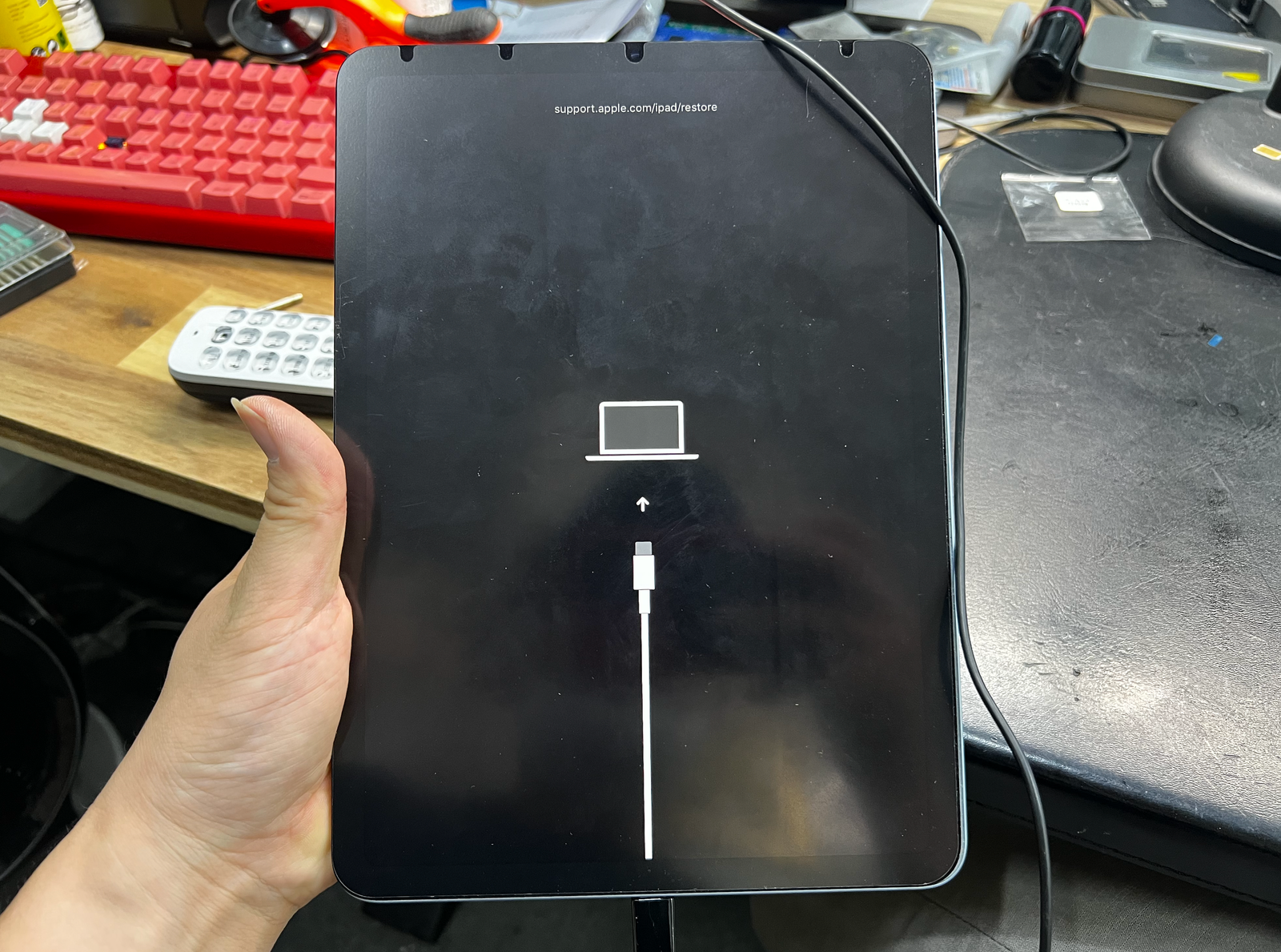
This iPad Air 4 landed on the corner where the power button lives. The button shattered, sank into the frame, and never came back up. A power button stuck in the pressed position does strange things to an iPad — this one had dropped into DFU mode and sat there showing nothing but a black screen. Here is how we removed the broken button, reshaped the channel it rides in, fitted a new button, and watched it boot normally again — step by step.

Button shattered by the drop, stuck pressed — iPad in DFU mode
Broken button out, channel ground flat, new button in
Out of DFU, clean click restored — done within 1–2 hours
The job, on one card
Everything that matters about this repair, before the story.
| Model | iPad Air 4 — one of the models with Touch ID built into the power button |
|---|---|
| Symptom | Dropped on the power-button corner. The button shattered and sank into the frame, stuck in the pressed position — and the iPad went into DFU mode, showing a black screen. A button pinned down like this typically causes DFU entry or an endless reboot loop; most of the time, it is DFU. |
| Repair | Screen separation → broken button assembly removed → the channel the button rides in ground flat → new button fitted → reassembled, normal boot and click feel verified. |
| Turnaround | Within 1–2 hours · same day |
| Difficulty | Difficult4 / 5 |
| Tech’s note | The hard part of this repair is the hard part of every iPad repair — separating the screen. iPad glass is wide and thin; it has to come off carefully, and it only comes off cleanly in hands that have done it many times. The button swap itself is not the challenge — getting to the button is. I have opened more iPads than I can count, which is why a repair like this is finished within an hour or two. |
What a sunken power button actually does
It does not stop at "the button won't come up." A button pinned in the pressed position shakes the whole device.
DFU mode, or an endless reboot loop
With the button stuck pressed, the iPad believes someone is holding it down forever. The result is either an endless reboot loop or a drop into DFU mode — the black recovery screen — and in our experience it is usually DFU. On the outside it looks exactly like a dead iPad, which is why it so often gets mistaken for a logic board failure.
Sometimes a short takes the battery with it
When the button is crushed or shattered, the damage can create a short — one that quietly drains the battery until the battery itself fails. In those cases fixing the button alone is not enough: the battery has to be replaced too before the iPad is usable again. This is why we always check battery health as part of the diagnosis.
After a button swap, Touch ID no longer works
We say this up front, honestly: every power button carries a unique serial number that is paired to the logic board. Replace the button with a different one, and normal fingerprint unlock is gone — that pairing cannot be recreated by ordinary repair. Power and lock functions come back completely; unlocking is done by passcode from then on.

Broken button out, channel reshaped, new button in
In the order it actually happened on the bench.

Through the hardest gate first — screen off, button out
Every iPad repair starts at the same gate: separating the screen. The wide, thin glass comes up slowly with gentle heat — the single most delicate stage of this entire job. Once the screen is safely off, the rest opens up. The shattered button assembly, still sunk in its channel, comes out. That is it in the photo — the drop did not leave much of it.

The channel has to be ground flat — this is the heart of it
The impact deformed the channel the button rides in. Unless that surface is ground flat again, no button — new or old — will ever come back up. Grind too little and the new button still binds; grind too much and it rattles. So it goes a little at a time: grind, test, grind, test, until the original clearance is back.

The new button goes in
A new button assembly seats into the reshaped channel and its flex gets connected. Before anything is reassembled, the button gets pressed dozens of times by hand — checking that it travels freely and clicks evenly. If anything feels even slightly off, the channel gets dressed again before the screen goes back on.

The boot screen is the proof
With the button no longer pinned down, the iPad climbs out of DFU mode on its own and starts a normal boot. The Apple logo appearing on a device that would only show black — that is the moment this repair proves it was mechanical all along, not a dead board.
It turns on, and it clicks again
Reassembled and tested, right before it left the bench.
Out of DFU, click restored
After the normal boot we tested every button function — power, lock, forced restart. Battery health was checked as well: this unit was lucky, with no short-related battery damage, so the button replacement alone finished the job.
As explained before the repair, the replacement button is not serial-paired to this board, so Touch ID is no longer available. The customer chose to proceed knowing that, and unlocks with a passcode now — everything else works exactly as it should.

Broken power buttons — common questions
What people with this exact symptom actually ask us.
The screen is black and it won't wake up. Is the board dead?
If it happened after a drop on the button side, suspect the button before the board. A power button pinned in the pressed position pushes the iPad into DFU mode — a black screen — or into a reboot loop. Repair the button, and in most of these cases the iPad boots right up.
Is it just the button, or the battery too?
The button replacement is the baseline. But when a crushed button causes a short, it can drain and eventually kill the battery — and then the battery must be replaced as well before the iPad is usable. We check battery health during diagnosis and tell you the full scope before any work starts.
What happens to Touch ID after the button is replaced?
It stops working. Each power button carries a unique serial paired to the logic board, and a different button cannot inherit that pairing — so normal fingerprint unlock is no longer available. Power and lock functions are fully restored, and you unlock with your passcode. We always explain this before the repair, never after.
How long does the repair take?
Within 1–2 hours. The gate for this job is the screen separation, and after opening more iPads than we can count, it is a same-day repair — usually even when a battery replacement gets added to the job.
Is my data safe?
Yes. A button replacement never touches storage — photos, apps and settings stay exactly as they were. One important warning: the DFU screen itself does not mean your data is gone, but restoring the iPad from that screen will erase it. Do not restore — bring it in as it is.
Do you do this repair on other iPad models?
Yes. The same symptom and the same repair apply to every iPad with Touch ID in the power button — iPad Air 4 and 5, iPad mini 6, iPad 10th gen and others. The Touch ID limitation after replacement applies the same way on all of them.
Dropped on the button and now it's just a black screen?
Don't restore it — that erases your data. Diagnosis is free: we will tell you whether it is the button alone or the battery too, with the scope and the price, before anything is opened. Walk-ins welcome in Downtown Los Angeles.